数据缺失率可视化

Xing Abao Lv3

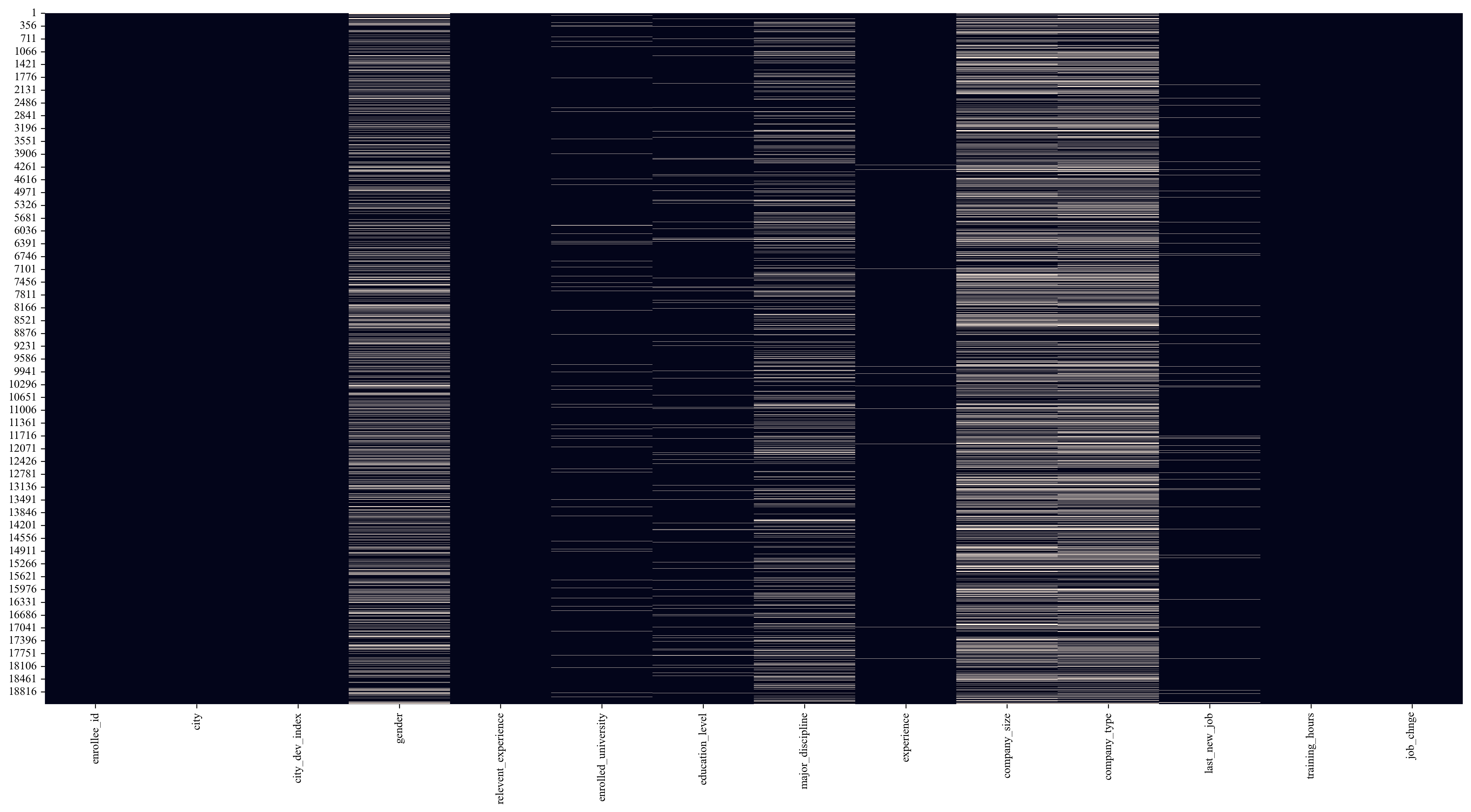
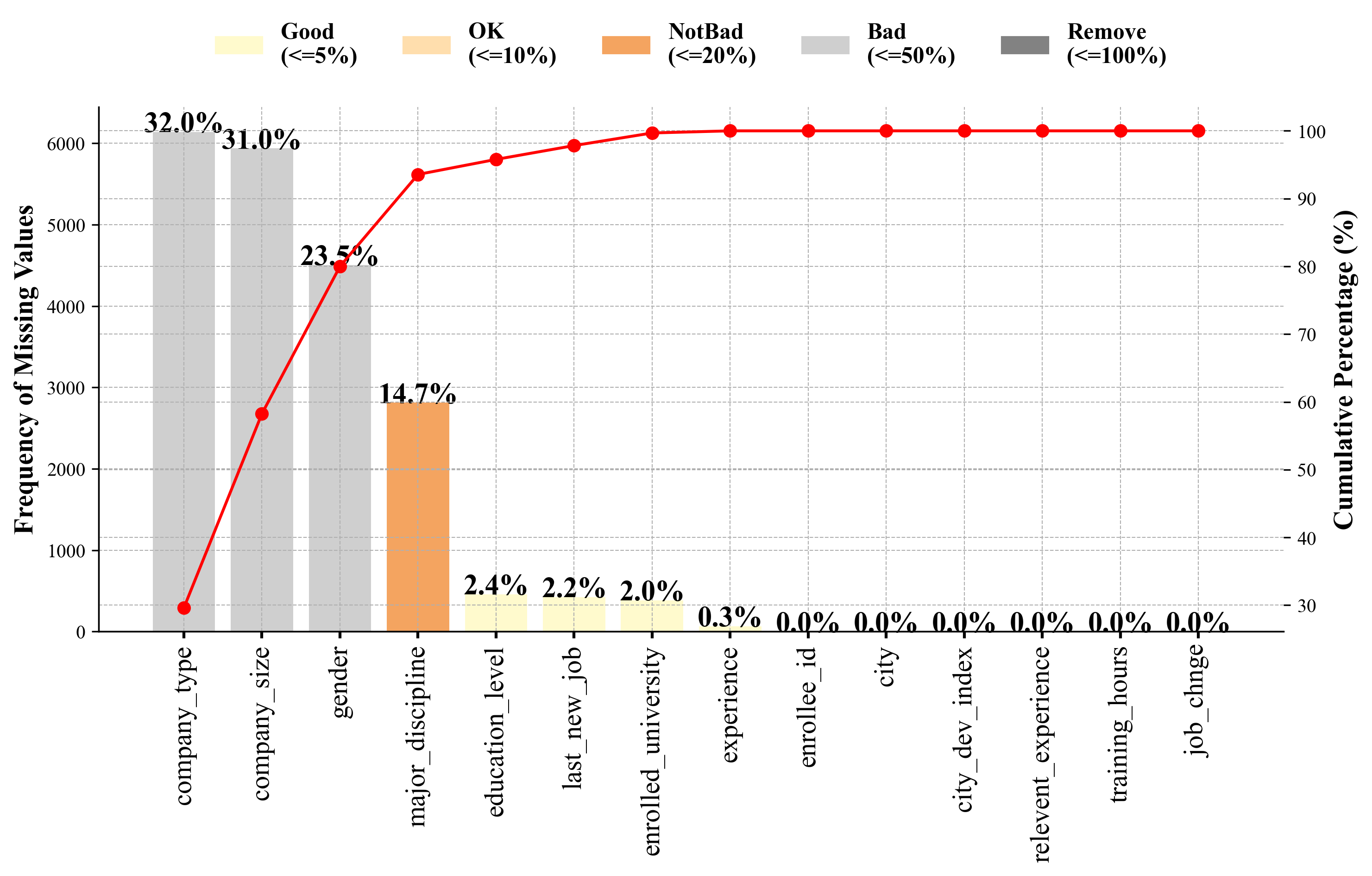
通过可视化,我们不仅能了解缺失的程度,还能发现缺失数据之间可能存在的模式,这对于后续的数据清洗和模型建立非常有帮助。

为什么要做缺失值可视化?

  1. 快速评估数据质量:直观地了解每个特征 (列) 缺失了多少数据,以及整个数据集的完整度。
  2. 发现缺失模式:缺失是随机发生的,还是存在某种规律?例如,某个变量的缺失是否总是伴随着另一个变量的缺失?这种模式的发现对选择填充策略至关重要。
  3. 指导数据清洗策略:如果一个特征缺失率极高 (例如超过 90%),我们可能会考虑直接删除该特征。如果只是少量缺失,则可以考虑填充。
  4. 沟通与报告:向团队成员或利益相关者清晰地展示数据质量问题。

模拟案例

加载模块

1
2
3
4
5
6
7
8
9
10
11
12
# pip install clust-learn
# https://github.com/malgar/clust-learn

import pandas as pd
import numpy as np
from clearn.data_preprocessing import *
import matplotlib.pyplot as plt
import matplotlib.patches as mpatches
from matplotlib import font_manager

plt.rcParams['font.family'] = 'Times New Roman'
plt.rcParams['axes.unicode_minus'] = False

加载数据

1
2
3
4
5
6
import os
wkdir = 'C:/Users/Administrator/Desktop'
os.chdir(wkdir)

path = 'Z:/TData/big-data/sad41d8cd/251106_Data_Missingness_Overview_Chart.csv'
df = pd.read_csv(path, index_col = 0)
1
2
3
4
5
6
7
8
9
10
df.head()
Out[3]:
enrollee_id city city_dev_index ... last_new_job training_hours job_chnge
1 8949 city_103 0.920 ... 1 36 Yes
2 29725 city_40 0.776 ... >4 47 No
3 11561 city_21 0.624 ... never 83 No
4 33241 city_115 0.789 ... never 52 Yes
5 666 city_162 0.767 ... 4 8 No

[5 rows x 14 columns]
1
2
3
4
5
6
7
df.columns
Out[4]:
Index(['enrollee_id', 'city', 'city_dev_index', 'gender',
'relevent_experience', 'enrolled_university', 'education_level',
'major_discipline', 'experience', 'company_size', 'company_type',
'last_new_job', 'training_hours', 'job_chnge'],
dtype='object')
1
2
3
4
5
6
7
8
9
10
11
12
13
14
15
16
17
18
19
20
21
22
df.info()
<class 'pandas.core.frame.DataFrame'>
Index: 19158 entries, 1 to 19158
Data columns (total 14 columns):
# Column Non-Null Count Dtype
--- ------ -------------- -----
0 enrollee_id 19158 non-null int64
1 city 19158 non-null object
2 city_dev_index 19158 non-null float64
3 gender 14650 non-null object
4 relevent_experience 19158 non-null object
5 enrolled_university 18772 non-null object
6 education_level 18698 non-null object
7 major_discipline 16345 non-null object
8 experience 19093 non-null object
9 company_size 13220 non-null object
10 company_type 13018 non-null object
11 last_new_job 18735 non-null object
12 training_hours 19158 non-null int64
13 job_chnge 19158 non-null object
dtypes: float64(1), int64(2), object(11)
memory usage: 2.2+ MB

计算缺失率

1
compute_missing(df, normalize = True)
1
2
3
4
5
6
7
8
9
10
11
12
13
14
15
16
Out[3]: 
var_name missing
10 company_type 32.049274
9 company_size 30.994885
3 gender 23.530640
7 major_discipline 14.683161
6 education_level 2.401086
11 last_new_job 2.207955
5 enrolled_university 2.014824
8 experience 0.339284
0 enrollee_id 0.000000
1 city 0.000000
2 city_dev_index 0.000000
4 relevent_experience 0.000000
12 training_hours 0.000000
13 job_chnge 0.000000

画热图 (简要展示)

1
2
missing_values_heatmap(df, output_path = None, savefig_kws = None)
plt.savefig("heatmap.png", bbox_inches = 'tight', dpi = 300)

画折线图 (复杂展示)

1
2
3
4
5
6
7
8
9
10
11
12
13
14
15
16
17
18
# 计算每列的缺失值数量
missing_counts = df.isnull().sum()

# 计算缺失值的频率
missing_percentage = (missing_counts / len(df)) * 100

# 创建一个新的DataFrame,并将特征名作为一列
missing_data_df = pd.DataFrame({
'Feature': missing_counts.index,
'Missing Count': missing_counts,
'Missing Percentage (%)': missing_percentage.round(1) # 保留一位小数
})

# 按照缺失值百分比从高到低排序
missing_data_df = missing_data_df.sort_values(by='Missing Percentage (%)', ascending = False)

# 计算缺失值的累计百分比(按照缺失值百分比的顺序进行累加)
missing_data_df['Cumulative Percentage'] = (missing_data_df['Missing Count'] / missing_data_df['Missing Count'].sum()).cumsum() * 100
1
2
3
4
5
6
7
8
9
10
11
12
13
14
15
16
17
18
19
missing_data_df
Out[8]:
Feature ... Cumulative Percentage
company_type company_type ... 29.614624
company_size company_size ... 58.254956
gender gender ... 79.998071
major_discipline major_discipline ... 93.565813
education_level education_level ... 95.784498
last_new_job last_new_job ... 97.824724
enrolled_university enrolled_university ... 99.686490
experience experience ... 100.000000
enrollee_id enrollee_id ... 100.000000
city city ... 100.000000
city_dev_index city_dev_index ... 100.000000
relevent_experience relevent_experience ... 100.000000
training_hours training_hours ... 100.000000
job_chnge job_chnge ... 100.000000

[14 rows x 4 columns]
1
2
3
4
5
6
7
8
9
10
11
12
13
14
15
16
17
18
19
20
21
22
23
24
25
26
27
28
29
30
31
32
33
34
35
36
37
38
39
40
41
42
43
44
45
46
47
48
49
50
51
52
53
54
55
56
57
58
59
60
61
62
63
# 为不同的缺失值百分比定义颜色区间
def get_color(percentage):
if percentage <= 5:
return '#FFFACD', 'Good (<=5%)' # 颜色 #FFFACD
elif percentage <= 10:
return '#FFDEAD', 'OK (<=10%)' # 颜色 #FFDEAD
elif percentage <= 20:
return '#F4A460', 'NotBad (<=20%)' # 颜色 #F4A460
elif percentage <= 50:
return '#CFCFCF', 'Bad (<=50%)' # 颜色 #CFCFCF
else:
return '#828282', 'Remove (<=100%)' # 颜色 #828282

# 创建一个双轴图
fig, ax1 = plt.subplots(figsize = (11, 7))

# 绘制柱状图, 表示每个特征的缺失值数量, 使用不同的颜色
bars = []
for i, perc in enumerate(missing_data_df['Missing Percentage (%)']):
color, label = get_color(perc)
bar = ax1.bar(missing_data_df['Feature'][i], missing_data_df['Missing Count'][i], color = color, label = label if i == 0 else "")
bars.append(bar)

# 设置柱状图标签和网格线
ax1.set_ylabel('Frequency of Missing Values', fontsize = 14, fontweight = 'bold')
ax1.tick_params(axis = 'x', rotation = 90, labelsize = 14, width = 1.5)
ax1.grid(True, which = 'both', linestyle = '--', linewidth = 0.5)

# 添加百分比信息到每个柱状图的顶部
for i, bar in enumerate(bars):
height = bar[0].get_height() # 获取每个条形的高度
perc = missing_data_df['Missing Percentage (%)'][i]
ax1.text(bar[0].get_x() + bar[0].get_width() / 2, height + 1.8, f'{perc}%', ha = 'center', fontsize = 15, fontweight = 'bold', color = 'black')

# 创建第二个轴,用于显示累计百分比
ax2 = ax1.twinx()
ax2.plot(missing_data_df['Feature'], missing_data_df['Cumulative Percentage'], color = 'r', marker = 'o', label = 'Cumulative Percentage')
ax2.set_ylabel('Cumulative Percentage (%)', fontsize = 14, fontweight = 'bold')
ax2.grid(True, which = 'both', linestyle = '--', linewidth = 0.5)

# 关闭顶部和右边的线条
ax1.spines['top'].set_visible(False)
ax1.spines['right'].set_visible(False)
ax2.spines['top'].set_visible(False)
ax2.spines['right'].set_visible(False)

# 手动添加图例
handles = [
mpatches.Patch(color = '#FFFACD', label = 'Good\n(<=5%)'),
mpatches.Patch(color = '#FFDEAD', label = 'OK\n(<=10%)'),
mpatches.Patch(color = '#F4A460', label = 'NotBad\n(<=20%)'),
mpatches.Patch(color = '#CFCFCF', label = 'Bad\n(<=50%)'),
mpatches.Patch(color = '#828282', label = 'Remove\n(<=100%)')
]

# 使用`prop`参数调整字体加粗和增大, 并将图例排成一行
legend_font = font_manager.FontProperties(weight = 'bold', size = 12)
ax1.legend(handles = handles, bbox_to_anchor = (0.5, 1.2), loc = 'upper center', ncol = 5, frameon = False, prop = legend_font)
plt.savefig("linechart.png", bbox_inches = 'tight', dpi = 300)

# 显示图形
plt.tight_layout()
plt.show()

完整代码

1
2
3
4
5
6
7
8
9
10
11
12
13
14
15
16
17
18
19
20
21
22
23
24
25
26
27
28
29
30
31
32
33
34
35
36
37
38
39
40
41
42
43
44
45
46
47
48
49
50
51
52
53
54
55
56
57
58
59
60
61
62
63
64
65
66
67
68
69
70
71
72
73
74
75
76
77
78
79
80
81
82
83
84
85
86
87
88
89
90
91
92
93
94
95
96
97
98
99
100
101
102
103
104
105
106
107
108
109
110
111
112
113
114
115
116
117
118
119
120
# -*- coding: utf-8 -*-

import pandas as pd
import numpy as np
from clearn.data_preprocessing import *
import matplotlib.pyplot as plt
import matplotlib.patches as mpatches
from matplotlib import font_manager

plt.rcParams['font.family'] = 'Times New Roman'
plt.rcParams['axes.unicode_minus'] = False

if __name__ == '__main__':

import os
wkdir = 'C:/Users/Admins/Desktop'
os.chdir(wkdir)

# 读取数据
path = 'Z:/TData/big-data/sad41d8cd/251106_Data_Missingness_Overview_Chart.csv'
df = pd.read_csv(path, index_col = 0)

if True:
df.head()
df.columns
df.info()

# 计算缺失率
compute_missing(df, normalize = True)

# 画热图 (简要展示)
missing_values_heatmap(df, output_path = None, savefig_kws = None)
plt.savefig("heatmap.png", bbox_inches = 'tight', dpi = 300)

# 画折线图 (复杂展示)
# 计算每列的缺失值数量
missing_counts = df.isnull().sum()

# 计算缺失值的频率
missing_percentage = (missing_counts / len(df)) * 100

# 创建一个新的DataFrame,并将特征名作为一列
missing_data_df = pd.DataFrame({
'Feature': missing_counts.index,
'Missing Count': missing_counts,
'Missing Percentage (%)': missing_percentage.round(1) # 保留一位小数
})

# 按照缺失值百分比从高到低排序
missing_data_df = missing_data_df.sort_values(by='Missing Percentage (%)', ascending = False)

# 计算缺失值的累计百分比(按照缺失值百分比的顺序进行累加)
missing_data_df['Cumulative Percentage'] = (missing_data_df['Missing Count'] / missing_data_df['Missing Count'].sum()).cumsum() * 100


if True:

# 为不同的缺失值百分比定义颜色区间
def get_color(percentage):
if percentage <= 5:
return '#FFFACD', 'Good (<=5%)' # 颜色 #FFFACD
elif percentage <= 10:
return '#FFDEAD', 'OK (<=10%)' # 颜色 #FFDEAD
elif percentage <= 20:
return '#F4A460', 'NotBad (<=20%)' # 颜色 #F4A460
elif percentage <= 50:
return '#CFCFCF', 'Bad (<=50%)' # 颜色 #CFCFCF
else:
return '#828282', 'Remove (<=100%)' # 颜色 #828282

# 创建一个双轴图
fig, ax1 = plt.subplots(figsize = (11, 5))

# 绘制柱状图, 表示每个特征的缺失值数量, 使用不同的颜色
bars = []
for i, perc in enumerate(missing_data_df['Missing Percentage (%)']):
color, label = get_color(perc)
bar = ax1.bar(missing_data_df['Feature'][i], missing_data_df['Missing Count'][i], color = color, label = label if i == 0 else "")
bars.append(bar)

# 设置柱状图标签和网格线
ax1.set_ylabel('Frequency of Missing Values', fontsize = 14, fontweight = 'bold')
ax1.tick_params(axis = 'x', rotation = 90, labelsize = 14, width = 1.5)
ax1.grid(True, which = 'both', linestyle = '--', linewidth = 0.5)

# 添加百分比信息到每个柱状图的顶部
for i, bar in enumerate(bars):
height = bar[0].get_height() # 获取每个条形的高度
perc = missing_data_df['Missing Percentage (%)'][i]
ax1.text(bar[0].get_x() + bar[0].get_width() / 2, height + 1.8, f'{perc}%', ha = 'center', fontsize = 15, fontweight = 'bold', color = 'black')

# 创建第二个轴,用于显示累计百分比
ax2 = ax1.twinx()
ax2.plot(missing_data_df['Feature'], missing_data_df['Cumulative Percentage'], color = 'r', marker = 'o', label = 'Cumulative Percentage')
ax2.set_ylabel('Cumulative Percentage (%)', fontsize = 14, fontweight = 'bold')
ax2.grid(True, which = 'both', linestyle = '--', linewidth = 0.5)

# 关闭顶部和右边的线条
ax1.spines['top'].set_visible(False)
ax1.spines['right'].set_visible(False)
ax2.spines['top'].set_visible(False)
ax2.spines['right'].set_visible(False)

# 手动添加图例
handles = [
mpatches.Patch(color = '#FFFACD', label = 'Good\n(<=5%)'),
mpatches.Patch(color = '#FFDEAD', label = 'OK\n(<=10%)'),
mpatches.Patch(color = '#F4A460', label = 'NotBad\n(<=20%)'),
mpatches.Patch(color = '#CFCFCF', label = 'Bad\n(<=50%)'),
mpatches.Patch(color = '#828282', label = 'Remove\n(<=100%)')
]

# 使用`prop`参数调整字体加粗和增大, 并将图例排成一行
legend_font = font_manager.FontProperties(weight = 'bold', size = 12)
ax1.legend(handles = handles, bbox_to_anchor = (0.5, 1.2), loc = 'upper center', ncol = 5, frameon = False, prop = legend_font)
plt.savefig("linechart.png", bbox_inches = 'tight', dpi = 300)

# 显示图形
plt.tight_layout()
plt.show()
  • Title: 数据缺失率可视化
  • Author: Xing Abao
  • Created at : 2025-11-06 12:30:45
  • Updated at : 2025-11-06 12:53:14
  • Link: https://bioinformatics.vip/2025/11/06/sad41d8cd/251106_Data_Missingness_Overview_Chart/
  • License: This work is licensed under CC BY-NC-SA 4.0.
Comments